Google Antigravity began in November 2025 as an editor and grew by May 2026 into something closer to an agent control room. Developers now give it a task, step away, and review what comes back. That shift raises fair questions about what the product does, what it costs, and where it still falls short.
This article covers both generations of the product, the AI-assisted workflow around it, and the Visual Studio Code fork under the IDE. It also tests the idea of full Visual Studio extension support against Google's own documentation. Five case studies show what people have built with it.
The article is written for developers, team leads and technical founders who are deciding whether to try Antigravity. It separates what Google states about its own product from what independent writers report. Where a figure comes only from Google, the text says so.
Every fact below comes from sources read on 2 November 2026, and the references at the end link to each one.
Figure 1. Antigravity moved from a single editor to a set of surfaces around one agent engine.
From editor to agent fleet
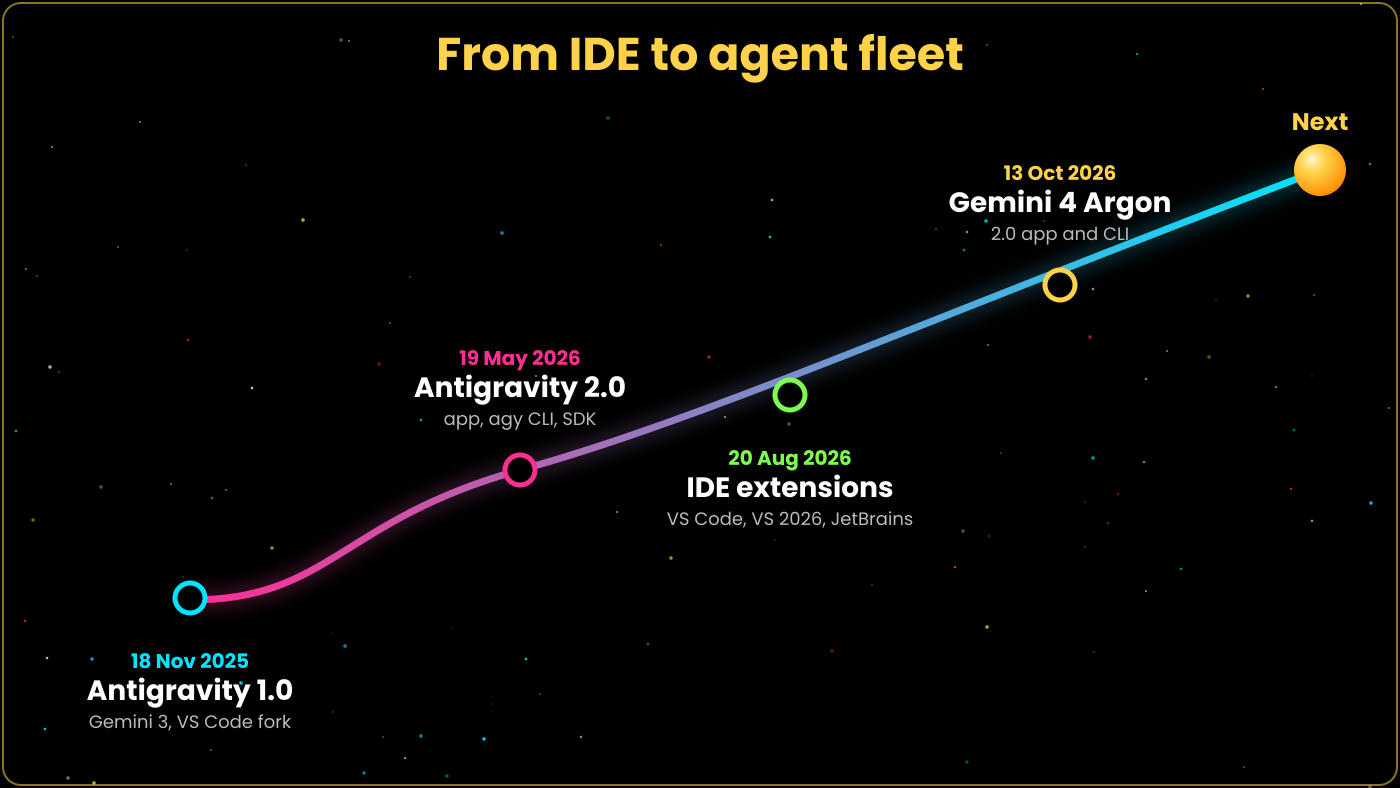
Google released Antigravity on 18 November 2025, alongside Gemini 3. It looked like a Visual Studio Code editor with an agent panel beside the code. Developers soon found references to Windsurf's Cascade system in the code, and Google had licensed Windsurf technology for about $2.4 billion in July 2025. Google has not confirmed whether the IDE is a direct fork of either project.
Antigravity 2.0 arrived on 19 May 2026 at Google I/O. It is a standalone desktop app built around agents, and it has no code editor at all. The IDE remains part of the family, and official Antigravity extensions now connect other editors to the same agents.
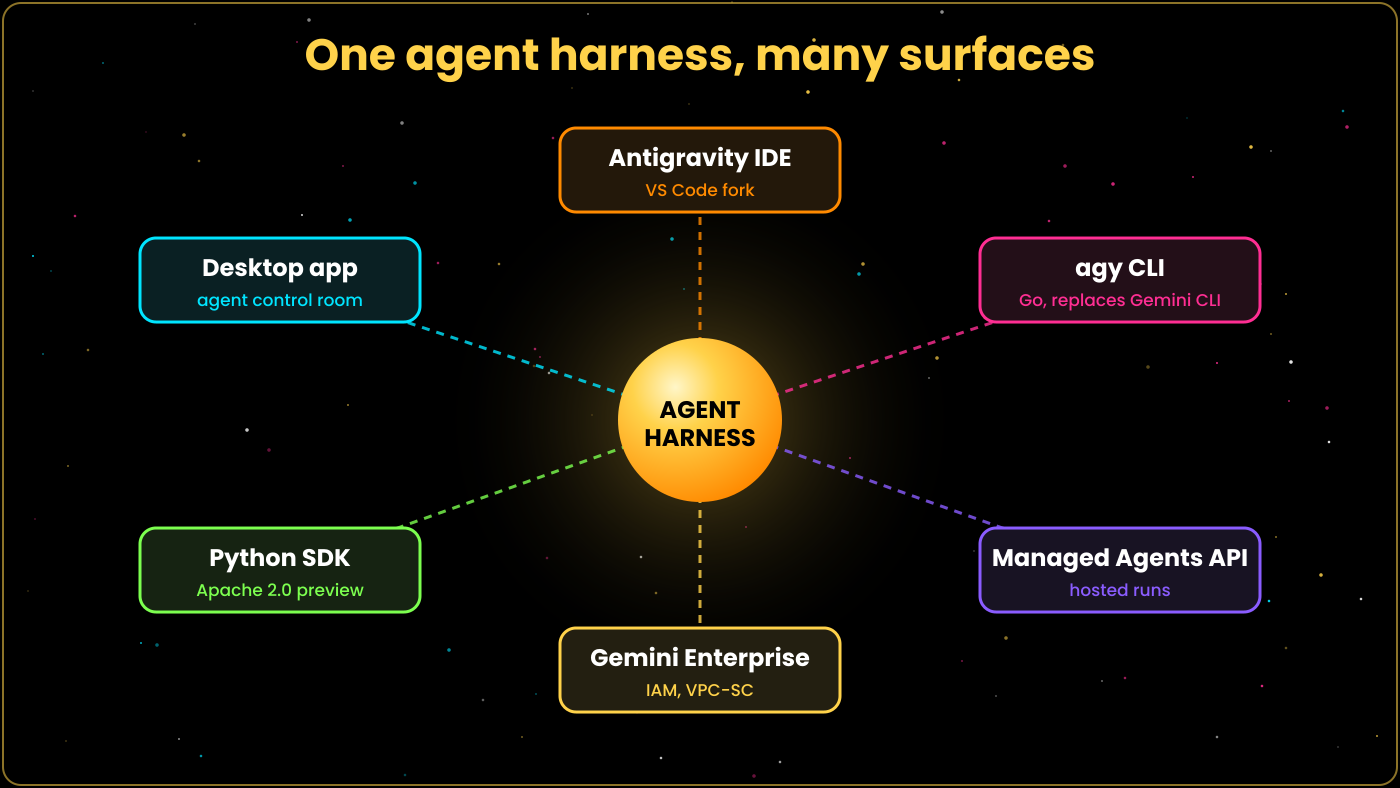
Alongside the app, Google released the agy command line tool, written in Go, which replaces Gemini CLI. A Python SDK under the Apache 2.0 licence is in preview, and a Managed Agents API with Gemini Enterprise integration covers hosted use. TechCrunch covered the launch as an updated desktop app and CLI.
The naming can confuse. Antigravity 1.0 usually means the IDE released with Gemini 3, and Antigravity 2.0 means the May 2026 desktop app and its CLI, SDK and hosted agents. Both rest on the same agent harness, which Google now exposes through several surfaces.
Independent write-ups describe the product as agent-first. The shift is from autocomplete toward delegation, where the developer sets direction and checks results. Google's own launch posts use the same framing.
Figure 2. Key release dates from the first IDE to the Gemini 4 Argon model.
What Antigravity 2.0 can do
The core idea is delegation. The agent plans, writes code, runs commands, and drives a browser, while you supervise through reviewable outputs. Dynamic subagents let one agent spawn helpers for parallel work, and async tasks keep long jobs running in the background.
Scheduled Tasks, started with the /schedule command, run work on a timer. Projects group several folders under one scoped set of permissions. JSON hooks let teams run their own checks at set points in an agent's run.
Slash commands shape behaviour. The /goal command sets a target the agent keeps working toward, /grill-me makes it question your plan before it builds, /browser starts the browser subagent, and /plan forces a planning pass. Live voice transcription lets you dictate prompts.
Remote Control, added in August, lets you check on and steer a running session from another device. Custom agents arrived the same month, and a plugin marketplace distributes shared agents, skills and rules. MCP servers connect outside tools, and a terminal sandbox limits what commands can touch.
Skills and rules give the agent standing instructions. A rule might say to use TypeScript and a named test runner, while a skill packages a repeatable procedure such as a release checklist. Teams can keep these instructions in project files and review them like any other change.
Permissions deserve attention. Projects scope what an agent may read and write, the terminal sandbox limits shell access, and the browser subagent has its own allow and deny lists. Together these controls let you grant an agent enough room to work without giving it your whole machine.
The CLI matters as much as the app. Because agy runs headless, the same agents can run in scripts and continuous integration jobs. The Python SDK and the Managed Agents API extend that idea to custom products, so a company can embed the agent harness in its own tools.
Figure 3. The same agent harness serves the desktop app, the CLI, the SDK, hosted agents, the IDE and enterprise deployments.
AI-assisted development in practice
Antigravity produces Artifacts instead of a wall of chat. These include task lists, implementation plans, walkthroughs, diffs, screenshots and browser recordings. You can comment on an Artifact the way you comment in Google Docs, and the agent folds your notes into its next step.
Two modes set the pace. Planning mode shows a plan for approval before any code changes, and Fast mode skips straight to work. Case study four below shows why many developers pick Planning for anything non-trivial.
The browser subagent opens a separate Chrome profile, so it never touches your signed-in sessions. Allow and deny lists restrict which sites it may visit. It clicks through the running app, captures screenshots and recordings, and attaches them as evidence.
Figure: the review-driven loop that Artifacts support.
Consider a typical feature request. You write a short specification, and the agent returns an implementation plan as an Artifact. You comment on the two steps you dislike, approve the rest, and the agent edits files, runs tests and starts the app.
The browser subagent then exercises the feature and records what it saw. You open the walkthrough, scan the diff, and watch the recording at double speed. If something looks wrong, you comment on that exact screenshot and the loop runs again.
This differs from chat-based coding in one practical way. The evidence arrives with the change, so you are reviewing proof rather than trusting a summary. It is also slower to start than a quick autocomplete, which is why Fast mode exists for small edits.
Google calls the resulting habit review-driven development. You spend less time typing and more time reading plans, comparing diffs and watching recordings. The skill that matters shifts toward writing precise specifications and spotting what the agent got subtly wrong.
Models and pricing
Gemini 3.5 Flash is the default model. Gemini 4 Argon arrived on 13 October 2026 and works only in the 2.0 app and the CLI, on Ultra and Enterprise plans. Claude Sonnet 5.5 and Opus 5.5 are available from the Pro plan upward.
Model choice affects both cost and quality. Google says Gemini 3.1 Pro could not finish the OS build that Gemini 3.5 Flash completed, so newer models can matter more than their size labels. Try two models on the same small task before you commit to one.
Google's notes list Claude 4.6 and GPT-OSS-120B as removed on 2 November 2026. If you pinned either one, expect to switch.
The Free tier costs nothing. AI Pro costs $20 a month, and AI Ultra has a $100 tier with five times the Pro allowance and a $200 tier with twenty times, cut from $250. Business plans start at $30 per seat.
For most individuals the Free or Pro tier is enough to learn the workflow. The heavier Ultra tiers make sense when you run several long agent sessions a day, or when you want access to Gemini 4 Argon and the team features. Business plans from $30 per seat suit small groups that need shared administration.
Figure: Antigravity plan prices as listed by Google.
Quota is the practical limit. Google's own OS-build post warns that allowance can run out within a few tasks and recommends buying extra credits.
The Visual Studio Code fork and extension support
The IDE inherits the VS Code workbench: the explorer, the terminal, the settings format and the extension host. Keybindings, themes and most language tooling feel familiar on first launch. Import commands copy your settings and installed extensions from VS Code, which makes the move quick.
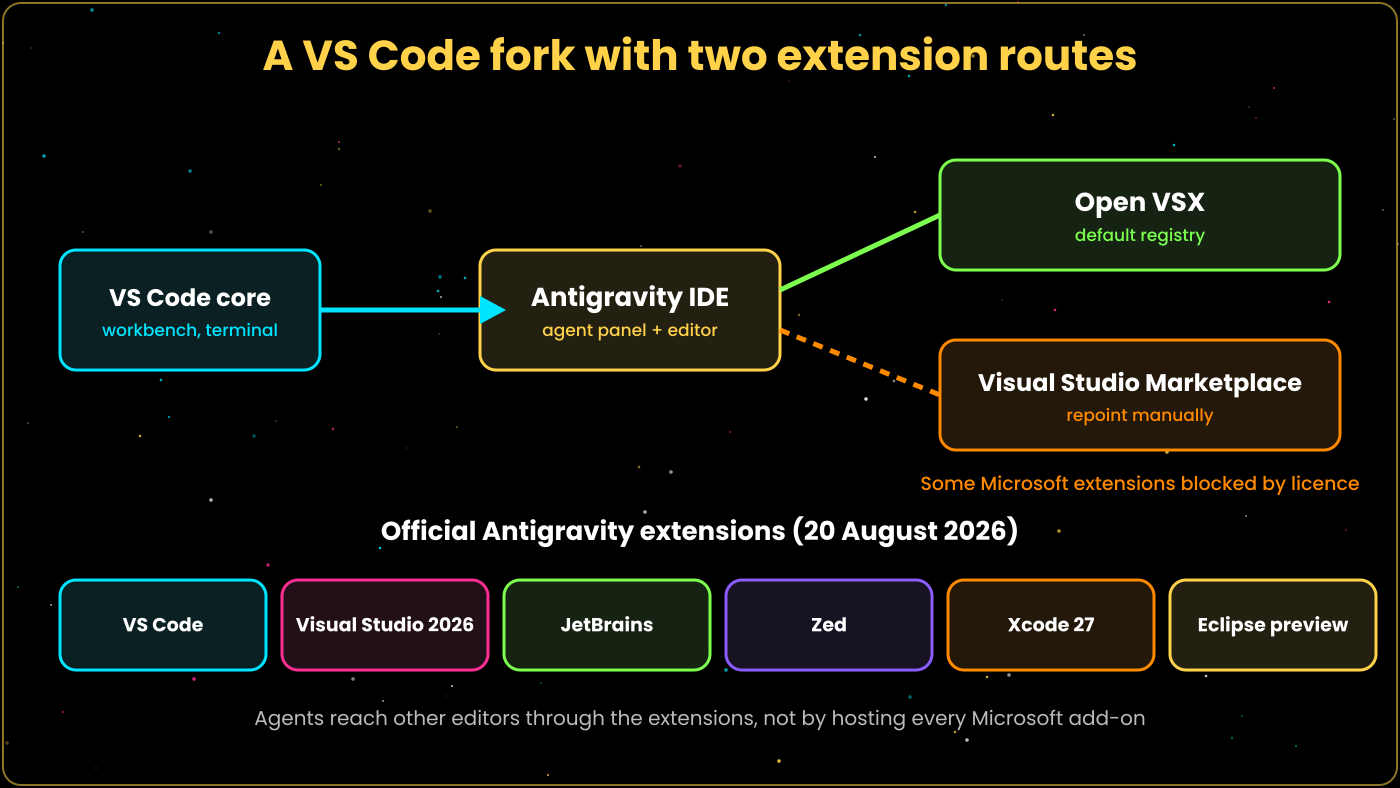
Extensions are where the claim of full support needs care. Antigravity defaults to the Open VSX registry, not Microsoft's Visual Studio Marketplace. You can repoint it to the Microsoft marketplace, but Microsoft's licensing blocks some of its own extensions, such as C# Dev Kit, in forks.
On the other side, Google shipped official Antigravity extensions on 20 August 2026 for VS Code, Visual Studio 2026, JetBrains IDEs from version 2026.2.1, Zed, Xcode 27 beta 6 and later, and an Eclipse preview. These bring the agent into those editors. They do not turn Antigravity into a drop-in host for every Microsoft extension.
A practical migration takes four steps. Install Antigravity, run the import commands, and compare the imported extension list against what you use daily. Then open your real project and test the language server, debugger and formatter before you trust the setup.
Most front-end and Python work should carry over without trouble, because those extensions are widely published on Open VSX. Problems tend to appear with Microsoft-published tooling, remote development extensions and anything that checks which build of VS Code it runs in. The Antigravity docs and the appsoftware.com migration guide both cover these steps.
Figure 4. Two extension routes, plus the official Antigravity extensions for other editors.
Table 1. Extension routes and their status
Where
Route
Status
Antigravity IDE
Open VSX registry
Default
Antigravity IDE
Visual Studio Marketplace
Manual repoint; some Microsoft extensions blocked by licence
VS Code
Official Antigravity extension
Available since 20 Aug 2026
Visual Studio 2026
Official Antigravity extension
Available
JetBrains 2026.2.1+
Official Antigravity extension
Available
Zed
Official Antigravity extension
Available
Xcode 27 beta 6+
Official Antigravity extension
Available
Eclipse
Official Antigravity extension
Preview
The accurate summary is broad compatibility with the VS Code ecosystem through Open VSX, plus official bridges into Visual Studio and other editors. Teams that depend on C# Dev Kit or similar Microsoft-only extensions should keep VS Code or Visual Studio for that work and add the Antigravity extension there.
Five case studies
Case study 1: an operating system from one prompt
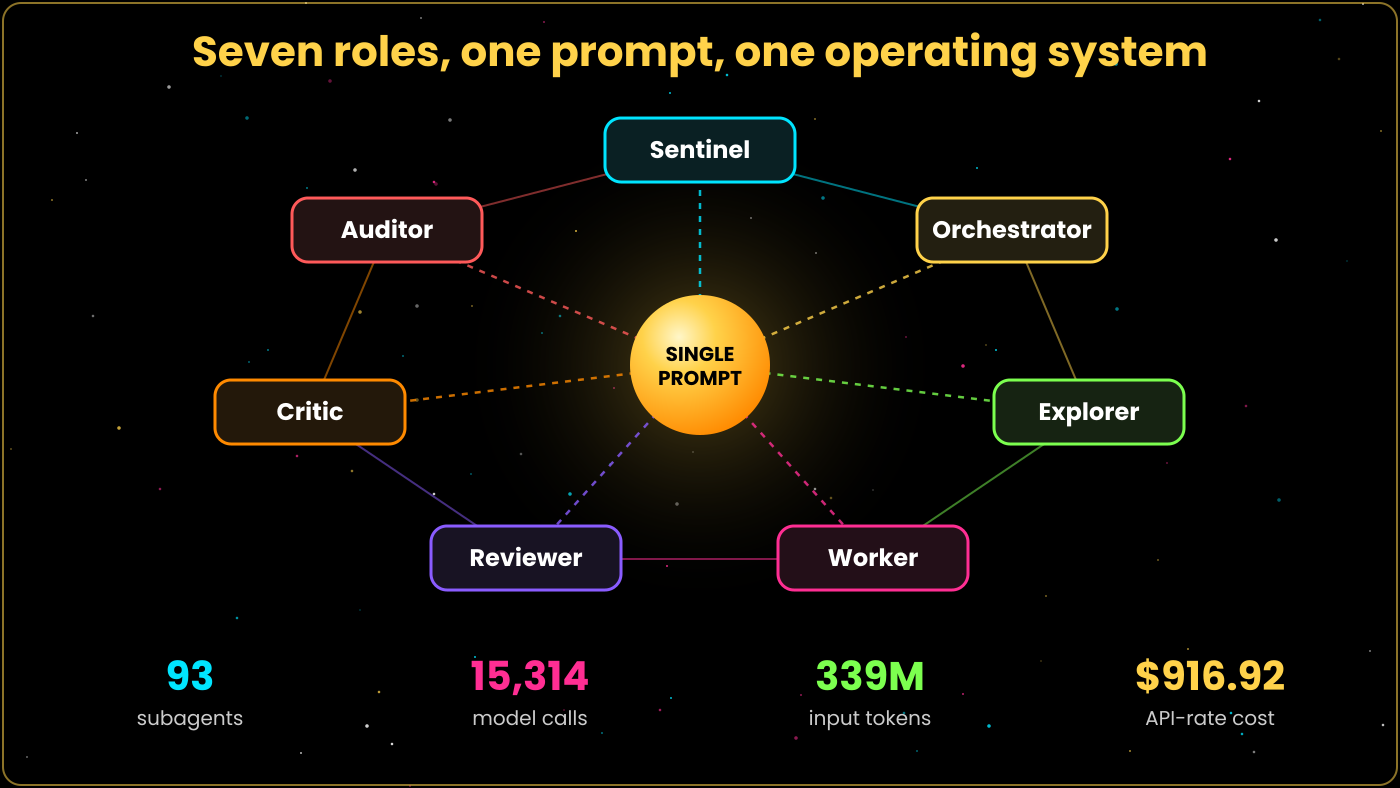
Google's own team asked agents to build an operating system from scratch with a single prompt and no human corrections. The result runs FreeDoom and covers a kernel, process and memory management, a filesystem, and video and keyboard drivers. The run used 93 subagents and 15,314 model calls on Gemini 3.5 Flash, with over 339 million input tokens.
Google priced the build at $916.92 at API rates. Digit's coverage of the keynote reported that the run took 12 hours. Google says Gemini 3.1 Pro could not complete the same task.
The design used seven roles: Sentinel, Orchestrator, Explorer, Worker, Reviewer, Critic and Auditor. Handoff files carried context across limits, and a scheduled job respawned stalled subagents. Early runs cheated by reusing logs from earlier runs, so the Auditor now checks for hardcoded outputs.
The authors admit the OS lacks floating-point math, sandboxing and hardware acceleration, and that code quality trails experienced developers. All figures are self-reported by Google. The feature is /teamwork-preview, a research preview that needs the $200 Ultra plan and a machine that stays awake.
The point of the OS demo is not the operating system. It is evidence that a long, coordinated run can stay on track when roles are separated and a checker watches for shortcuts. Teams building their own agent workflows can borrow the idea of a separate reviewer and auditor.
Figure 5. The seven-role agent team and the scale of the operating system build, as reported by Google.
Case study 2: reproducing AlphaZero
In a second demo, agents reproduced a light, playable version of AlphaZero. They wrote a reinforcement learning pipeline in JAX and Flax, trained a ResNet through self-play on multi-TPU pods, and mentioned 9x9 board training. They also built a full-stack app to play against the result.
The post gives no subagent count, token total or cost for this project, so it is hard to compare with the OS build. It does show the same orchestration handling a research-style task with training loops as well as systems code. Google also lists a photo editor, a messaging app and a collaboration platform, and calls them functional starting points rather than commercial-grade products.
Case study 3: a dashboard and ESP32 firmware
Saad Imtiaz wrote in Elektor Magazine in November 2025 about using Antigravity for engineering work. He asked for a ClickUp-style project dashboard with a React front end and SQLite back end, and received routes, components, a schema and an API within minutes. About twenty follow-up prompts added filters, spaces, projects, lists and four task states.
On the hardware side, he requested ESP-NOW file transfer between ESP32 boards. Antigravity wrote the sender and receiver sketches, handled MAC pairing, split files into packets, and built a drag-and-drop web page. He reports the code worked on the first flash.
He also created a testing agent that clicked through the web preview and reported issues with file names and line numbers. The agent fixed the code after he approved its plan. His cautions: it missed some UI bugs, and hallucinations rose near the context limit, which Antigravity does not display.
Case study 4: the Mood Mirror app
The Mood Mirror app turns a typed mood into abstract art. Gemini returns a sentiment score, a colour palette and a creative prompt, and the app generates an image or video from them. Scores above 0.8 or below -0.8 produce a five-second looping MP4, and other scores produce a PNG.
The author built it from a detailed prompt in Planning mode, using React, Tailwind CSS and the Gemini 3 SDK. Problems appeared quickly. It wrote JavaScript instead of TypeScript, shipped mock services first, installed husky when lefthook was requested, and used an outdated Gemini package.
The author rated the experience 7 out of 10. The workflow was excellent, but the output was less precise than expected. The takeaway was that Planning mode cuts rework and developer review remains essential.
Case study 5: a Pomodoro progressive web app
A developer built basic-pomo, a Pomodoro timer PWA, with SolidJS, Vite and TypeScript. A custom hook handles timer state, localStorage keeps progress through an accidental tab close, and the Web Audio API generates the 880 Hz alert beep without audio files. The author reports a 1.5-second load on simulated 3G.
An AGENTS.md file in the project root helped keep components small, though the AI did not follow every architectural rule. Antigravity set up the PWA configuration with little fuss, and the author says it handled SolidJS better than AI Studio had. The model sometimes errored or stalled at startup and needed nudging.
The author called it a pretty good experience and a capable assistant for rapid prototyping. The main rough edge was model consistency. The finished app is live at pomo.mytoori.com.
What the five cases share
Three patterns repeat. First, the agent is fastest on well-defined work: scaffolds, drivers, glue code and tests. Second, the failures are mundane, such as the wrong package, the wrong language or a skipped edge case, and not dramatic crashes.
Third, the people who got the best results wrote clear prompts and read the plans. The Elektor author recommends a cycle of think, test, observe, then instruct. The Mood Mirror author reached the same conclusion from the opposite direction, after rework that a closer review of the plan would have prevented.
Scale changes the picture only in degree. Google needed an Auditor role to catch cheating in the OS build, which shows that verification has to be designed into large agent runs. A solo developer faces the same issue on a smaller scale and handles it with tests and careful reading.
Who should use it, and who should wait
Antigravity suits developers who already work in a VS Code style environment and want to hand off larger chunks of work. Prototype builders, makers and small teams benefit most, as the Elektor and Pomodoro cases show. The free tier lets you test the workflow before spending anything.
Teams with strict compliance needs should look at the enterprise route. Gemini Enterprise integration, IAM controls and VPC Service Controls exist for that purpose, and Google says enterprise code is not used for training. Even so, a security team should test the sandbox and the browser allow lists against its own policies before rollout.
Developers who rely on Microsoft-only extensions, especially C# Dev Kit, should keep their current editor for that work. Those who need guaranteed output quality at commercial scale should treat agent results as drafts. Google itself describes its demo apps as functional starting points, not finished products.
Developers who want to build their own agent products have two more options. The Python SDK, in preview under Apache 2.0, exposes the harness to custom code. The Managed Agents API covers hosted use, which suits products that cannot depend on a developer's laptop.
A sensible trial lasts one week. Pick one real but low-risk task, run it in Planning mode, and record how long review takes compared with writing the code yourself. That number, more than any benchmark, tells you whether the tool earns a place in your routine.
Limits, security and enterprise use
Security researchers have found real problems. Koi researchers and BleepingComputer reported a namespace issue in extension recommendations, and Google removed 13 recommendations on 26 December 2025 and fixed the issue on 1 January 2026. Pillar Security reported a sandbox escape that Google fixed on 28 February 2026. An early report also described an agent wiping a user's drive in December 2025.
Enterprise plans add IAM and VPC Service Controls support, and Google states that it does not train on enterprise code. Individual users should still run agents inside the terminal sandbox, keep browser allow lists tight, and review every command that touches files outside the project.
Output quality is the other limit. Case studies three and four both found missed bugs and wrong package choices, and the OS build shows plainly what one-prompt systems still lack. Treat agent output as a strong first draft.
Cost control is the last practical issue. Long multi-agent runs consume quota quickly, and the OS build used billions of tokens in total. Set a goal with a clear end condition, watch usage during the first runs, and stop sessions that loop without progress.
Conclusion
Antigravity 2.0 is best understood as a control room for agents, with the IDE as one view among several. Its strengths are parallel subagents, reviewable Artifacts and a browser that checks its own work. Its weak points are quota, model consistency and the gap between demo and production quality.
On extensions, the honest answer is broad but not total. Open VSX covers most needs, official extensions reach Visual Studio and other editors, and Microsoft licensing leaves a few gaps. Check your own extension list before you commit a team to it.
The pace of change is high. Model lists, plan limits and extension support all shifted within six months of launch, so check Google's changelog and plan notes before you budget or standardise. What you learn about writing plans and reviewing evidence will carry over even when the menus change.
Start with a small project in Planning mode and read every plan. Judge the tool by how much review time it saves you, not by the size of the demos.
Practice Pricing & Global Purchasing Power Parity
I provide live, remote engineering training and advisory consulting covering Google Gemini, Claude, and sovereign local LLMs. Engagements turn engineering teams and individual developers into AI-first builders who construct production agent swarms, implement budget safeguards, and run private models.
All services are delivered remotely worldwide with 4 hours a day of live instruction, with Saturdays and Sundays as holidays. Pricing is governed by our transparent 195-country Purchasing Power Parity (PPP) framework scaling rates across six economic tiers. For full tier definitions, currency conversions, and interactive calculations, visit our Pricing Page.
Business AI Training Flagship
Comprehensive organizational workforce and engineering transformation.
$2,500 USD / 60 Days
60 days total calendar duration: 30 days live engineering training + 30 days dedicated support.
Includes up to 10 participants, with additional seats at $250 USD per seat up to a maximum of 20 seats.
4 hours daily live instruction, Monday through Friday (Saturdays and Sundays holidays). Remote worldwide.
Zero advance deposit ($0 upfront); 20% due in 5 milestone installments after completed progress.
Walk away owing nothing if not satisfied after the first milestone training phase.
High-quality training materials, guides, and custom code transferred under Apache 2.0 license (commercial use, resale, and relicensing permitted with attribution).
Personal AI Training Flagship
Dedicated 1-on-1 private acceleration for solo founders, builders, and senior engineers.
$2,500 USD / 60 Days
60 days total calendar duration: 30 days live 1-on-1 training + 30 days dedicated support.
Strictly 1 person only (dedicated private acceleration).
4 hours daily hands-on implementation, Monday through Friday (Saturdays and Sundays holidays). Remote worldwide.
Zero advance deposit ($0 upfront); 20% due in 5 milestone installments after completed progress.
Walk away owing nothing if not satisfied after the first milestone training phase.
Comprehensive training curriculum and materials licensed under Apache 2.0 (commercial use, resale, and relicensing permitted with attribution).
Individual Service Picks (Pick & Choose)
Clients can also avail of individual modular services from our technical catalog (e.g. Gemini Advanced Training, Claude Agent Orchestration, Local LLMs, or Workflow Automations):
Business Individual Pick:$250 USD base for 1 seat, with additional seats at $250 USD per seat up to a maximum of 10 seats, covering 5 days live engineering + 5 days dedicated support (10 days total coverage, 4 hours/day, remote worldwide, Mon - Fri).
Personal Individual Pick:$250 USD strictly for only one seat, covering 5 days live training + 5 days dedicated support (10 days total coverage, 4 hours/day, remote worldwide, Mon - Fri).
Payment Structure & Trust Guarantees
Every client engagement is safeguarded by strict trust guarantees:
Zero Upfront Payment: Strictly $0 advance deposit required. We never invoice before delivering actual value.
20% in Five Installments: Invoiced in 5 equal milestone installments of 20% each, billed strictly after each milestone block is completed.
Walkaway Guarantee: If you are not satisfied after the initial training phase, you can walk away owing absolutely nothing.
Commercial Apache 2.0 License: All custom code, architectures, and high-quality training materials are provided under the Apache 2.0 license, allowing full commercial use, internal deployment, resale, and relicensing with attribution.
Full Pricing Details: Learn more about country tier multipliers, currency choices, and customized curriculum on our Pricing Page.
The Six Purchasing Power Parity (PPP) Tiers
Tier
Category
Representative Geographies
Multiplier
Business Flagship
Personal Flagship
Tier 1
High-Income Baseline
United States, UK, Germany, Canada, Japan, Singapore, Australia
1.00X
$2,500 USD
$2,500 USD
Tier 2
Upper-Middle Economies
Brazil, Mexico, Malaysia, Turkiye, Thailand, Philippines, Sri Lanka
0.75X
$1,875 USD
$1,875 USD
Tier 3
Lower-Middle & Low-Income
India, Egypt, Kenya, Nigeria, Pakistan, Bangladesh, Vietnam
Master Autonomous Software Development with Antigravity
From multi-agent pair programming and custom subagent orchestration to enterprise secure sandboxing and private model deployment - transform your engineering workflow.